Docs’n’Dash
A digital space for managing documents, clients, tasks and essential business data.
One place to manage your business
Docs’n’Dash organises work for small teams and independent professionals around money, clients, documents and next steps.
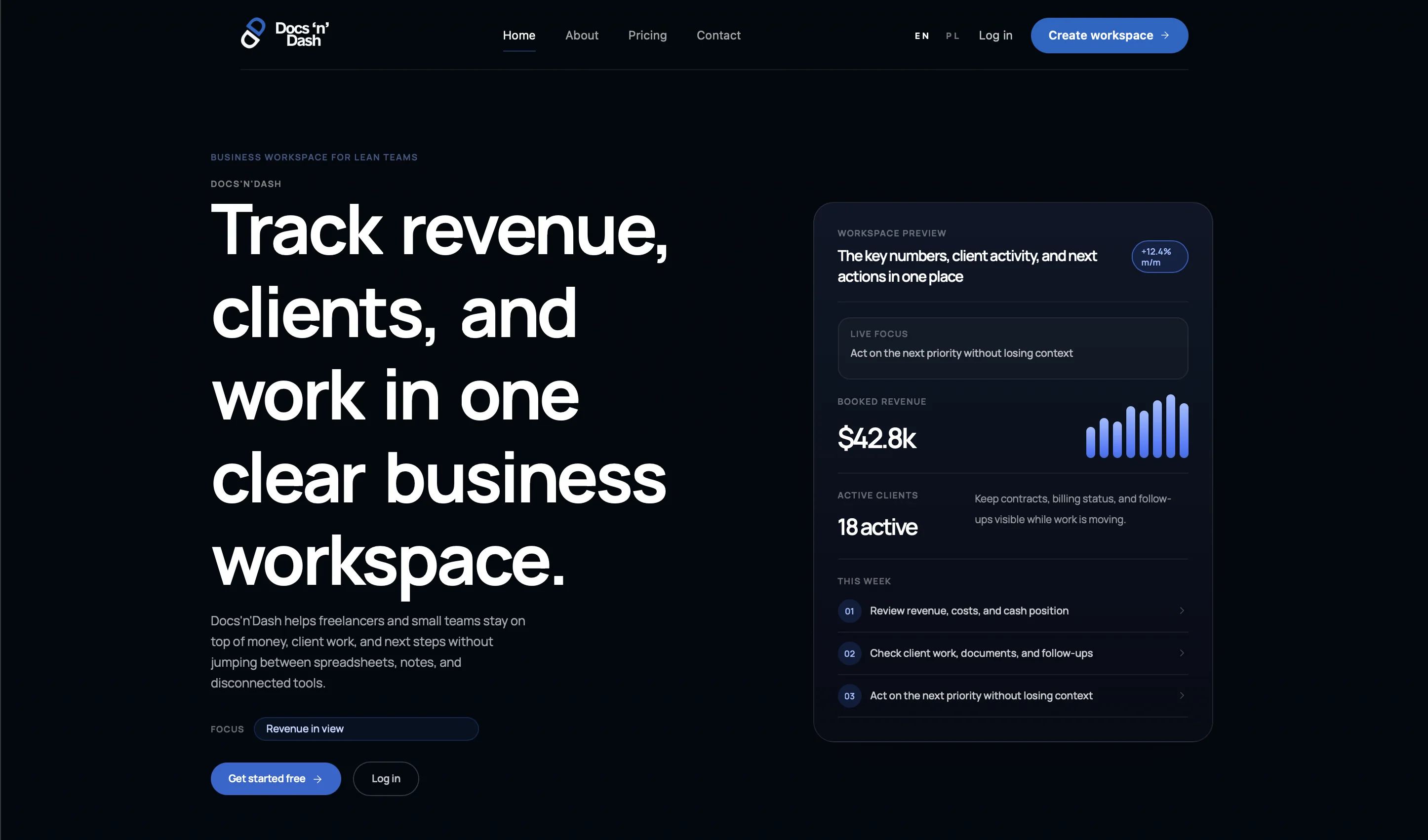
The project screenshot shows the product’s marketing story and workspace preview: revenue, active clients, documents, follow-ups and weekly priorities in one clear layout.
Challenge
Present a comprehensive product as a clear workspace that keeps essential data easy to find and everyday steps simple.
Build the landing page narrative around real work: revenue, clients, documents and next actions.
Keep the product preview readable despite the many types of information in one dashboard.
Distinguish the marketing message from the application interface while maintaining a shared UI language.
Information structure
The diagram shows only the areas visible or described in the available material: revenue, client activity, documents, follow-ups and next actions.
On mobile, this structure becomes a simple list to preserve readability.
UX that makes complexity manageable
The interface establishes a hierarchy: the product promise first, then a workspace preview with data, client activity and an action list.
The visible layout reduces competition between elements. Lines, segments and short labels let the main dashboard hold a wealth of information without visual overload.
A large headline describes the product, while the preview shows how it works in practice.
The visible menu includes home, about, pricing, contact, login and a workspace creation CTA.
Data and tasks are separated by lines, short labels and restrained contrast.
Dashboard
The workspace preview is central to the product story: key figures, client activity and next actions come together in one dashboard.
The homepage preview brings essential business data and current tasks together in one place.
A system designed to grow
The visible product system uses a dark surface, blue accent, simple divisions and dashboard-style components.
The logo, navigation, buttons, workspace panel, labels, metrics and action list form a shared visual product language.

Menu, languages, login and the main workspace creation CTA.
A blue button provides the main conversion accent.
The preview uses segments, lines and short operational labels.
Revenue, client activity and percentage change appear as dashboard elements.
A weekly list organises the next steps in your work.
Large marketing typography contrasts with the compact UI.
A product that needed a clear story
The marketing website explains the product through one strong message: revenue, clients and tasks in one clear workspace.
The application and website have distinct roles: the landing page establishes the promise and guides people to a CTA, while the workspace preview shows how the product organises daily work.
Visit Docs’n’Dash ↗Project scope
- 01Product design
- 02Information architecture
- 03UX/UI
- 04Dashboard preview
- 05Website design
- 06Landing page structure
- 07Product positioning
- 08Communicating value
Outcome
The result is a structured SaaS product presentation with a clear interface language and a marketing story centred on the workspace.
The case study shows consistency between the website’s promise and the product: data, clients, documents and next actions communicated as one working system.